
Overview
A dev machine for every AI agent, inside a browser tab. ClientVM runs Node.js 24, a real
bash and the unmodified npm entirely in the browser. Each agent gets isolated instances with
their own filesystem, processes and network. It runs npm install and npm run dev and previews
the app it built, with no containers and no servers to pay for.
Quickstart · Hosting · API reference · Live demo · GitHub
npm install @clientvm/clientvm @clientvm/terminal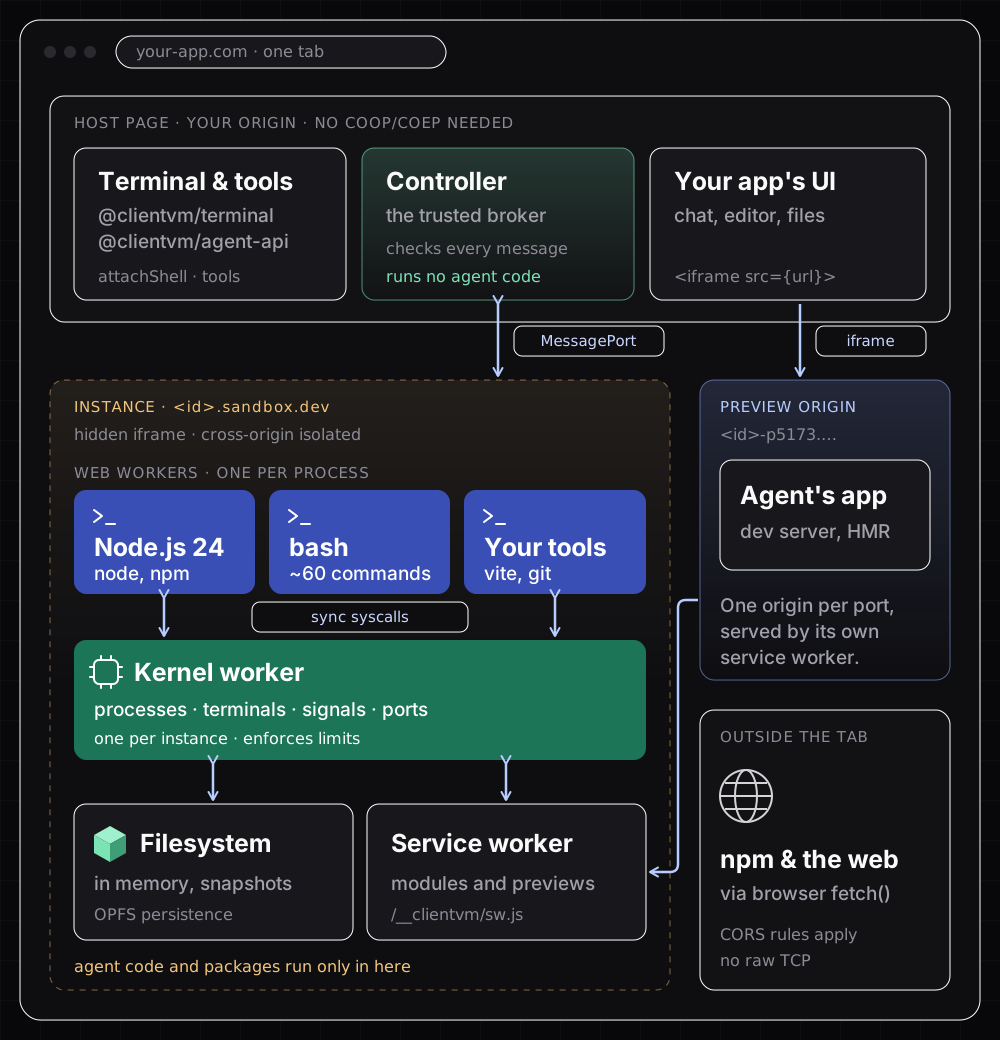
Choose your path
- Run code an agent writes. Boot an instance, give it files, run
execandspawn, and show the preview. Start with the quickstart. - Give an LLM a computer.
@clientvm/agent-apiturns an instance into tool definitions for files, commands, dev servers and driving the preview. See the agent tool API. - Show users what is running.
@clientvm/terminalattaches an interactivebash, or a read-only feed of the agent’s commands, to any xterm.js-compatible terminal (terminal README). - Understand the sandbox before you trust it. Read how it works and the security model.
Quick start
import { createClientVM } from '@clientvm/clientvm';

const vm = createClientVM({ sandboxOrigin: (id) => `https://${id}.myapp-sandbox.dev` });
const app = await vm.createInstance({ preset: 'vite-react-ts' });

app.onPortOpen((port, url) => (preview.src = url));
await app.spawn('npm', ['run', 'dev'], { cwd: '/home/user/app' });createClientVMcreates the controller on your page.sandboxOriginsays where the sandbox you deploy answers for each instance.createInstanceboots an instance. Thevite-react-tspreset is a ready Vite + React + TypeScript project withnode_modulesinstalled. It is built once and then boots in about 0.2 s.onPortOpenreports the preview URL when a server inside the instance starts listening.spawnstarts a process and streams its output.execruns a command line to completion.
The quickstart walks through each step, including the terminal and the agent tools.
How ClientVM works
- Your page runs the controller. It is the only trusted part. It boots each instance in a hidden iframe on a sandbox origin of its own and checks every message that comes back.
- Each instance is a small operating system. A kernel worker owns an in-memory filesystem,
a process table, terminals, signals and virtual ports. Every process (
node,bash,npm,vite) is a Web Worker. Blocking calls such asfs.readFileSyncreally block, on aSharedArrayBuffer, while the kernel answers. - Servers become private previews. When a process listens on a port, the instance’s service worker routes requests from a preview iframe to it, on an origin of its own.
Read how it works for the details, with diagrams.
What ClientVM supports
| Runtime | Node.js 24 APIs: fs, streams, http/net on virtual ports, child_process, worker_threads, crypto, zlib, CommonJS and native ESM. 592 of Node’s own tests pass in CI (compatibility matrix) |
| Package managers | The unmodified npm 11 and pnpm 10, fetched and verified on first use |
| Tooling | Stock Vite 6 and Vite 8 with HMR, React, Tailwind CSS 4, Express, git (on isomorphic-git) |
| Shell | sh/bash with pipes, job control, an interactive mode and about 60 Linux commands |
| Isolation | One browser origin per instance and per preview port; capabilities between instances |
| Browser | Chromium. Your app needs no COOP/COEP headers |
| Not supported | Safari and Firefox, native Node addons (other than the WebAssembly stand-ins), Python and other languages, raw TCP/UDP, outbound requests that CORS blocks |
Using a coding agent?
Every docs page is also served as Markdown: add .md to its URL, or start from
/llms.txt. All the docs in one file are at
/llms-full.txt. The landing page’s Copy agent
prompt button puts a ready integration prompt on your clipboard.
Next steps
- Deploy the sandbox: the hosting guide covers the domain, headers and a deployment check.
- Look up an API: the API reference.
- Why is it built this way? The design decisions, summarised on one page.